How to Create White Background Product Photos That Still Look Real
A white background is supposed to make your product look safer, clearer, and easier to buy. Instead, many sellers end up with grey backgrounds, jagged cutout edges, and fake-looking shadows that make the listing feel cheap. This guide shows when white-background images help, how to shoot source photos that survive editing, and how to generate clean results without turning your catalog into obvious AI.
Why do white background product photos still matter so much?
A white background does one important commercial job: it removes friction from the first glance. In a crowded grid, shoppers do not want to decode props, textures, or a dramatic set before they understand the product. They want to know what the item is, what shape it has, and whether the brand looks trustworthy enough to click. A clean white background strips away noise so the product carries the full weight of that first impression.
That matters most on marketplaces, comparison feeds, and collection pages where products compete side by side. If one seller uses a crisp, consistent white background and another uses a dim kitchen-table photo, the second listing starts from a trust deficit even when the product itself is better. White backgrounds work because they create visual predictability. Buyers can compare size, outline, finish, and color faster. That makes the catalog feel more professional and lowers the perceived risk of buying from a smaller brand.
White backgrounds also help the business behind the image. They are easier to reuse across storefronts, ads, wholesale sheets, and listing variants. They reduce styling decisions when speed matters. Most importantly, they let your first image do the simplest possible job: prove the product clearly. That is why white-background photography remains a default for commerce. It is not exciting, but it converts because clarity converts.
The mistake is assuming that any bright background counts. Buyers may forgive a casual lifestyle image in a social post. They are less forgiving when the main listing image looks muddy, off-white, or obviously cut out. On a white background, every shortcut becomes visible.
When is pure white required, and when is it just the smarter choice?
Not every image in a product gallery needs a pure white background. In fact, many brands sell better when they pair a clean hero image with warmer lifestyle or detail shots later in the gallery. But there are specific moments where white is either required or strategically safer. Amazon-style main images, Google Shopping feeds, retailer catalogs, distributor sheets, and comparison grids all reward clarity and consistency. In those environments, the image has less room to be interpreted. The product must read fast.
Even when a platform does not strictly require white, the first image often benefits from it. Shopify category pages, search results, and promotional grids are not reading environments. They are scanning environments. A clean background helps the eye find the product edge, understand the silhouette, and compare multiple SKUs without distraction. That is especially useful for brands with broad catalogs where consistency across dozens of products matters more than individual art direction.
Where sellers get into trouble is treating white background photography as a full-gallery strategy instead of a first-image strategy. A clean hero image should open the sale, not carry the entire brand story alone. Once the product is understood, lifestyle context, scale references, texture shots, and mood-driven frames become more useful. Clarity comes first. Emotion follows.
The practical rule is simple: use white when the image needs to answer "what is this?" faster than anything else. Use more expressive styling when the image needs to answer "why would I want it?" A good catalog usually needs both.
Why do cheap background removers make products look fake?
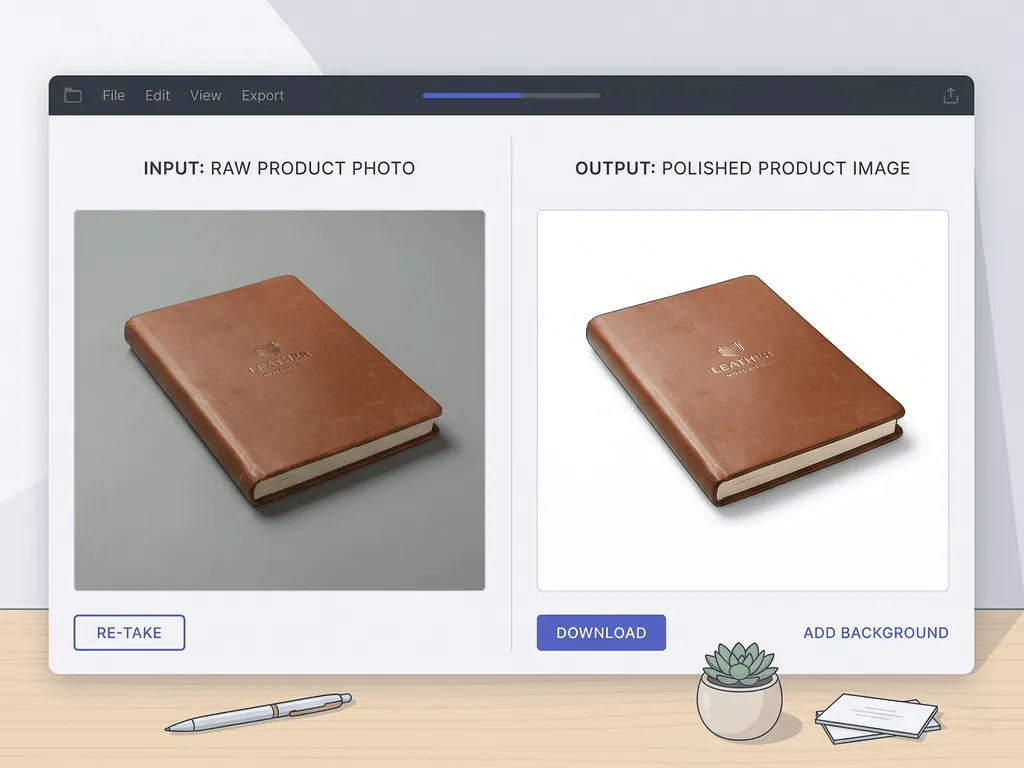
Most weak white-background images fail in predictable ways. The background is not truly white, but light grey. The product edge has a halo where the previous background was only half removed. Fine details like straps, translucent glass, jewelry prongs, or soft fabric edges get eaten away because the tool does not understand the product boundary. Then the editor tries to "fix" the result by dropping in a generic shadow that does not match the object shape or light direction. The final image looks technically clean and emotionally wrong.
That fake look is expensive because the buyer may not know what is wrong, but they can feel the image is not trustworthy. A bad cutout makes the product look pasted on. A flat shadow makes it look like it is floating. Over-whitening can erase texture and make cream, ivory, or clear materials lose distinction. The more premium the item, the more these mistakes hurt. Jewelry, cosmetics, electronics, and packaged goods all rely on edge quality and surface realism to justify price.
Simple background-removal tools are usually trained to separate subject from backdrop, not to preserve commercial believability. Product photography needs more than isolation. It needs edge discipline, material awareness, realistic grounding, and consistency from one SKU to the next. That is why a fast one-click remover may look acceptable for a quick social post but fall apart in a serious storefront.
If you want white backgrounds that still look real, the workflow has to protect the product first and whiten the scene second. The product cannot become collateral damage in the cleanup process.
How should you shoot the source photo so white-background generation works?
The strongest white-background result usually starts with an ordinary but disciplined source photo. You do not need a full studio. You need a sharp image, soft even light, and enough separation between the product and whatever is behind it. If the product is already clipped into a dark background, tangled in hard shadows, or covered in color casts from the room, the cleanup has less truthful information to work with.
Start with one clear light direction and avoid mixed bulbs. Indirect daylight or a large soft light source is usually enough. Keep the full product in frame and leave a little breathing room around the edges so the outline remains readable. For reflective or glossy objects, clean fingerprints and dust before shooting because bright backgrounds make every surface problem more obvious. For electronics, keep screens off or dark. For fashion, remove wrinkles. For accessories, aim for full sharpness across the item rather than dramatic blur.
The goal is not to create a final image in-camera. The goal is to preserve product truth. That means real contours, readable labels, believable material texture, and clean edge information. Once you have that, background generation becomes much more reliable. You are giving the system solid geometry and color to protect instead of forcing it to guess.
Sellers often lose time trying to rescue weak source images with more aggressive editing. It is usually faster to spend two extra minutes improving the original shot than twenty minutes fighting halos, missing edges, and unnatural shadows later.
Before-After-Bridge: what changes when the first image stops looking improvised?
Before: a small e-commerce catalog had good products and uneven listings. Some items were photographed on desks, others on poster board, and others in front of whatever wall happened to have decent light that day. A few images were manually cut out. A few still carried grey backgrounds. Nothing looked catastrophic, yet the store felt uncertain. The products did not look like they belonged to the same brand, and new launches always triggered another round of editing and compromise.
After: the catalog moved to a repeatable first-image system. Every core SKU got a clean white-background hero image with consistent framing, realistic grounding, and sharper visual hierarchy. Lifestyle images still existed, but they became supporting evidence instead of emergency compensation for weak product shots. The storefront stopped asking buyers to be generous. It started giving them an easy reason to trust the product at first glance.
The bridge was not a giant studio investment. It was a smarter workflow. The seller captured one clean source photo, then used a preset-based system to create the commercial-safe white background image needed for listings and feeds. That reduced reshoots, lowered editing time, and made new products easier to publish on schedule.
This is the hidden value of white-background discipline. It is not only about compliance or aesthetics. It is about operational consistency. When the first image becomes predictable, the rest of the catalog gets easier to manage, and the brand starts looking more stable to customers and to your own team.
How does Pixora fit this workflow without making everything look synthetic?
Pixora is strongest when the job is commercial clarity, not visual chaos. If you already have a clean source image, Smart Presets let you generate white-background product photos that stay focused on edge quality, material accuracy, and marketplace usefulness instead of forcing you to write prompt-heavy instructions. That matters because most sellers are not trying to become retouchers. They are trying to publish cleaner listings faster.
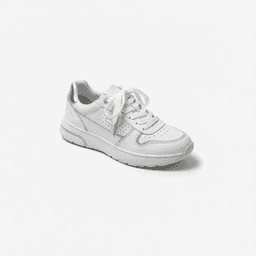
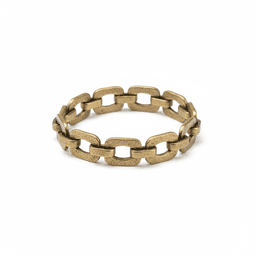
Use Fashion E-commerce Studio: Clean White Background for apparel and soft goods where shape and clean framing matter most. Use Accessory Studio: Clean White Background for jewelry, watches, bags, and detail-sensitive items where edge preservation is critical. Use Tech Studio: Clean White Background for electronics and products with glossy materials that need cleaner separation and a more deliberate studio feel. These presets are useful because they already understand the commercial job of the image.
The practical workflow is simple. Capture one honest product photo with soft light. Upload it to the preset that matches the category. Add a short note only if you need a small adjustment such as lighter shadow or a slightly different angle. The preset handles the white-background logic, while your source image preserves the product truth.
That is why this topic has Business Potential Score 3 for Pixora. A white-background product photo is not a side use case for the product. It is one of the clearest reasons the product exists. You are replacing manual cleanup, inconsistent cutout tools, and repeated studio work with a faster system that still respects how the product actually looks.
Why white-background product photos go wrong
Off-white or grey backgrounds make listings look less compliant and less trustworthy
Cheap cutout tools eat fine edges and make products look pasted on
Fake shadows and flattened reflections remove the sense of material quality
Manual editing for every SKU slows launches and breaks catalog consistency
The numbers behind cleaner first images
255,255,255
The RGB target sellers usually mean when they say a background must be pure white
30 sec
Typical time for a preset-based white-background variation from one strong source image
90%
Potential cost reduction versus repeated traditional reshoots and clipping-path work
Turn one product photo into a cleaner first image
Upload a real product shot, compare a manual cutout against a Smart Preset result, and see how much edge quality and consistency you recover before planning another reshoot.
Use soft even light, keep the full product in frame, and make sure texture, labels, and edges stay readable.
A trustworthy base image that protects product truth.
02
Choose the preset that matches the product
Use the clean white background preset built for fashion, accessories, or electronics instead of forcing one generic cutout workflow onto every SKU.
Better material handling and more realistic edge quality.
03
Publish the white-background hero first
Lead with the cleanest commercial image, then use later gallery images for mood, scale, and lifestyle context.
A catalog that feels clearer, safer, and easier to compare.
Pre-publish white background checklist
The background is truly white instead of light grey or dirty white
Product edges stay clean around straps, glass, metallic parts, and soft fabric
The object feels grounded with believable shadow or base contact
Fine details such as logos, labels, and texture are still readable
The first image is clearer than the rest of the gallery, not more dramatic
What improves when the first image becomes consistent
Marketplace and category pages become easier for shoppers to scan
Small brands look more organized and less improvised at first glance
New products launch faster because the hero-image workflow is repeatable
Manual cutout and retouching time drops across the catalog
Lifestyle images can focus on storytelling because the hero image already proves the product
Share this article
Build cleaner product listings without rebuilding your studio
Stop losing time to grey backgrounds, bad cutouts, and repeated manual cleanup. Start with one sharp product photo, choose the right Smart Preset, and publish cleaner white-background images faster.
It is a tool or workflow that isolates the product from the original scene and produces a clean white-background image for listings, marketplaces, and catalogs. The best versions do more than remove the backdrop. They also protect edges, texture, and realistic grounding.
No. White is usually best for the first image, catalog work, and marketplace placements where clarity matters most. Supporting gallery images often perform better with scale, texture, or lifestyle context.
They usually fail at edges, shadows, or material handling. Halos, floating products, flattened reflections, and over-whitened textures make the product feel pasted on instead of photographed.
Yes, if the source image is sharp, evenly lit, and captures the full product clearly. A strong phone photo with soft light is often better than a weak camera photo with harsh shadows and clutter.
Reflective metal, clear glass, glossy electronics, and fine accessories tend to be hardest because they expose edge mistakes quickly. These categories need better surface handling than a basic cutout tool can usually provide.
A practical starting set is Fashion E-commerce Studio: Clean White Background for apparel, Accessory Studio: Clean White Background for detail-sensitive products, and Tech Studio: Clean White Background for electronics and glossy materials.