AI Virtual Staging for Real Estate: Stop Letting Empty Rooms Cost You Showings
Empty rooms make buyers work too hard. They must imagine scale, flow, furniture placement, and emotional warmth from bare walls. Every cold listing photo risks fewer saves, fewer walkthroughs, and more price pressure. This guide shows how to use AI virtual staging for real estate without misleading buyers, wasting days, or paying thousands for physical staging.
AI virtual staging uses software to add realistic furniture, decor, lighting, and room styling to photos of empty or under-furnished properties. The goal is not to hide the truth. The goal is to help buyers understand how a space could function as a home, rental, office, or investment property.
For real estate agents, photographers, property managers, and developers, the value is speed. Traditional staging can require movers, furniture rental, scheduling, and property access. Manual virtual staging can still take one or more days per revision. AI staging compresses the first draft into minutes, which matters when a listing must go live today.
The strongest use cases are empty living rooms, bedrooms, dining areas, home offices, patios, and model-unit campaigns. The weakest use cases are cluttered rooms, complex renovations, heavy structural changes, and photos where the camera angle is too distorted to support believable furniture placement.
Pixora fits this workflow through Smart Presets. Instead of writing long prompts about furniture styles, lens behavior, and lighting, you upload a clean room photo, choose Real Estate: Virtual Staging & Furnishing, and optionally add short notes such as "warm modern apartment" or "minimal Scandinavian living room". The preset provides the staging direction while you keep the creative brief simple.
Why Do Empty Rooms Lose Buyer Attention?
Empty rooms look simple, but they create decision friction. A buyer scrolling through listings has to answer several questions at once: Will my sofa fit? Is this bedroom large enough? Could this room feel warm? Does the floor plan make sense? When the photo gives no scale cues, the buyer delays the decision or moves to a listing that feels easier to understand.
This is why staging affects emotion before logic. Furniture gives the eye reference points. A rug explains circulation. A dining table explains proportion. A bed makes a room feel useful instead of vacant. Buyers are not only evaluating square footage; they are rehearsing a future life inside the property.
There is also a trust issue. Empty rooms can look smaller than they are because there is nothing to anchor depth. They can also look colder because bare walls, hard floors, and harsh window light flatten the image. The result is a listing that may be technically accurate but commercially weak.
AI virtual staging solves the first impression problem when it is used honestly. It helps buyers visualize potential without the cost and logistics of a full physical setup. It also lets agents test different room functions. A spare room can become a home office for one campaign and a nursery for another, as long as the listing makes clear that the image is virtually staged.
The business risk is straightforward: if buyers cannot imagine the home, they do not book the showing. A stronger first photo does not replace pricing, location, or agent skill, but it can earn the attention those factors need.
When Should You Use Virtual Staging Instead of Physical Staging?
Use virtual staging when speed, budget, access, or asset volume matters more than in-person furniture impact. This includes vacant rentals, investor flips, new developments, remote listings, seasonal refreshes, and lower-to-mid price properties where physical staging would eat too much of the margin.
Physical staging still has a place. Luxury listings, complex floor plans, and properties with high in-person open-house traffic may benefit from real furniture because buyers experience the room with their bodies. A premium listing can also justify the cost when the staging plan supports a broader sales strategy.
The practical difference is commitment. Physical staging is a project. You choose furniture, coordinate delivery, protect the property, manage removal, and hope the style fits the target buyer. Virtual staging is an asset workflow. You can produce multiple visual directions, choose the one that fits the buyer profile, and publish without moving a sofa.
For many agents, the best answer is hybrid. Keep vacant-room photos for transparency. Add virtually staged versions immediately after them to show potential. In the description or image caption, disclose that images are virtually staged. This approach respects buyers while still improving the listing experience.
A good rule: if the property is empty and the buyer needs imagination more than physical confirmation, virtual staging is usually worth testing. If the property is already beautifully furnished, focus on photography quality, cleaning, lighting, and image order instead.
What Makes an AI-Staged Listing Photo Believable?
Believable virtual staging starts before the AI tool. The source photo must be clean, level, sharp, and honest. Keep the camera at a natural eye height or slightly lower for living spaces, avoid extreme wide-angle distortion, and make sure vertical walls stay straight. If the room bends at the edges, furniture will look bent too.
Lighting is the next signal. Furniture should match the room light. A sunlit room needs furniture shadows and highlights that feel consistent with the window direction. A darker room needs softer contrast, not showroom glare. When light does not match, buyers may not know the technical reason, but they feel the image is fake.
Scale is equally important. Sofas, beds, dining tables, and rugs must respect the room footprint. Oversized furniture makes the room feel impossible. Tiny furniture makes the room feel deceptive. Use architectural cues such as doors, windows, outlets, baseboards, and ceiling height to judge whether the staging is plausible.
Style should support the buyer profile, not the agent preference. A downtown rental may need compact modern furniture. A family home may need warmer, practical pieces. A luxury condo may need fewer objects and more negative space. The goal is not to decorate for everyone. It is to remove the biggest imagination gap for the most likely buyer.
Finally, avoid over-staging. Too many plants, lamps, pillows, and art pieces can make the room feel generated. Real homes have restraint. A sofa, rug, coffee table, side table, and one or two accents often do more than a crowded scene.
How Should Real Estate Teams Disclose Virtual Staging?
Disclosure is part of professional risk management. Rules vary by market, MLS, brokerage, and advertising channel, so teams should check local requirements before publishing. The safest general practice is simple: label virtually staged images clearly and never use AI to alter fixed property facts.
Do not remove structural flaws, change windows, move walls, replace flooring, hide damage, invent views, or make a room look larger than it is. Those edits cross from presentation into misrepresentation. Staging should add removable furnishings and decor, not change the property being sold.
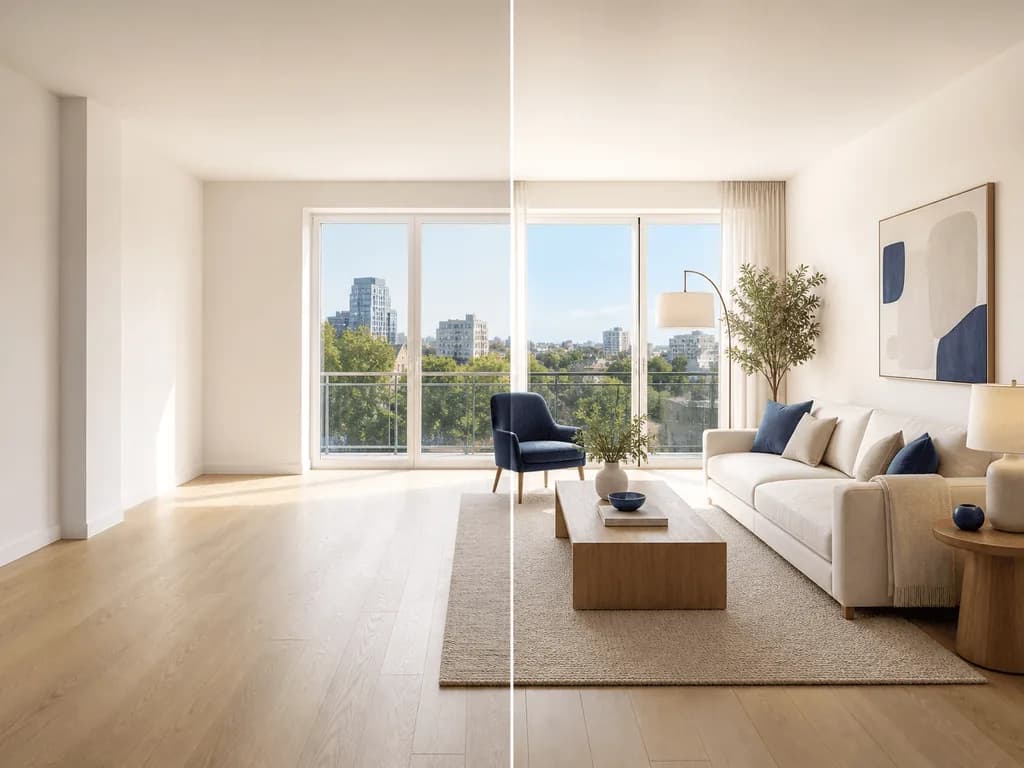
A transparent gallery order works well. Show the real empty room, then show the staged version. This gives buyers proof of the actual condition and a helpful vision of potential. It also reduces awkward conversations during showings because expectations are set before the visit.
For captions, use clear language such as "Virtually staged for visualization" or "Furniture and decor are digitally added". Avoid vague phrasing that sounds like a loophole. Buyers do not punish useful visualization when it is honest; they punish surprises.
Brokerages should also create an internal checklist. Confirm source photos are retained, edits are logged, staged images are labeled, and agents know which image is real and which is staged. This small process protects brand trust while allowing the team to move faster.
Before-After-Bridge: From Cold Vacant Listing to Buyer-Ready Story
Before: an agent has a clean but empty two-bedroom apartment. The rooms are bright, but the listing feels sterile. The living room looks smaller than the floor plan suggests because there is no furniture for scale. The second bedroom feels undefined, so buyers cannot tell whether it works better as a nursery, guest room, or home office. The property is priced well, yet saved listings and showing requests are slower than expected.
After: the team publishes a paired gallery. Each empty room is followed by a virtually staged version. The living room shows a compact sofa, rug, coffee table, and warm neutral accents. The second bedroom becomes a home office with a desk, shelving, and enough negative space to show flexibility. The listing still shows the truth, but now buyers can understand the lifestyle.
Bridge: the shift came from treating staging as buyer education, not decoration. With Pixora, the agent can upload the empty-room photos, use Real Estate: Virtual Staging & Furnishing, and guide the output with short notes for the target buyer. The work no longer depends on renting furniture or waiting through a long manual revision cycle.
The broader principle applies to any tool: stage the buyer question, not the room. If buyers wonder about scale, add furniture that explains scale. If they wonder about function, stage a clear use. If they wonder about warmth, choose lighting and materials that make the space feel lived in.
How Do You Build a Repeatable AI Virtual Staging Workflow?
A repeatable workflow starts with capture standards. Shoot every room from two clean angles: one wide enough to show layout, one tighter angle for emotional impact. Keep the camera level, avoid clutter, open curtains, turn off mixed-color bulbs when possible, and export high-resolution files before staging.
Next, define room intent before generating. Do not ask for generic furniture. Decide whether the room should sell as a family living room, compact rental lounge, home office, guest bedroom, luxury primary suite, or short-term rental setup. Clear intent prevents random styling and makes revisions faster.
Then generate a small test batch. In Pixora, choose Real Estate: Virtual Staging & Furnishing and add concise user notes. For example: "warm contemporary living room, light oak, cream sofa, minimal decor". Review the results for scale, light direction, style fit, and any object artifacts. Pick the strongest direction before processing the rest of the listing.
After generation, run a publish checklist. Compare staged and original images. Confirm no structural elements changed. Confirm doors, windows, outlets, flooring, and room boundaries remain accurate. Label the staged images. Then review the gallery on mobile, because many buyers first see the listing on a phone.
Finally, save your best notes by property type. A rental team may reuse one style pattern for apartments, another for family homes, and another for furnished-look short-term rental campaigns. This turns staging from a one-off task into a fast marketing system.
Why Real Estate Teams Get Stuck
Vacant rooms feel cold online and fail to show scale
Physical staging can be too expensive or slow for fast-moving listings
Shoot a clean, level, high-resolution photo with visible walls, floor, windows, and enough space for furniture placement.
A reliable source image that supports believable staging.
02
Choose the Buyer Story
Define the room function and style before generating: rental-friendly, family warm, luxury minimal, home office, or short-term rental ready.
Staging that answers a buyer question instead of adding random decor.
03
Review and Disclose
Check scale, lighting, fixed property details, and gallery order. Label staged images clearly before publishing.
A faster listing launch with stronger visualization and lower trust risk.
Pre-Publish Virtual Staging Checklist
The original empty-room image is saved and available for comparison
Furniture scale matches doors, windows, outlets, and room footprint
Lighting and shadows match the source photo direction
No fixed property features were added, removed, hidden, or changed
Every staged image is clearly labeled as virtually staged
What Improves with a Repeatable Staging System
More inviting first impressions for empty listings
Faster launch timelines when properties need to go live quickly
Lower dependence on movers, rentals, and physical staging logistics
Clearer buyer understanding of scale, flow, and room function
More consistent visual quality across agent and brokerage listings
Share this article
Turn Empty Listing Photos Into Rooms Buyers Can Imagine Living In
Start with one real room photo. Use Smart Presets to create a staged version, keep the original for transparency, and publish a listing gallery that works harder.
It depends on your local rules, MLS policies, brokerage standards, and advertising channels. In general, teams should disclose staged images clearly and avoid changing fixed property facts.
Yes. Showing both is usually the most transparent approach. Buyers see the real condition first and then get help imagining how the room could function.
Living rooms, bedrooms, dining areas, home offices, patios, and clean vacant rooms usually work best. Cluttered rooms and photos with extreme lens distortion are harder to stage well.
For many vacant listings, rentals, and fast campaigns, AI staging can replace the need for physical staging photos. Premium properties with heavy in-person showings may still benefit from physical staging.
Start with a level, sharp, high-resolution source photo. Then review scale, lighting direction, furniture style, and fixed property details before publishing.
No. Pixora uses Smart Presets for the main staging direction. You can add short user notes for style, but technical prompt engineering is not required.